
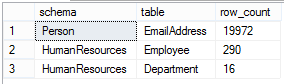
Often we need to know the number of records in a table. If you are looking for something very specific, such as the number of non-NULL values in a particular column, learn how to use COUNT() correctly with this post here. If you are looking for a basic record count for the entire table, however, COUNT() adds a lot of overhead that you simply do not need. This is because COUNT() will actually read all of your records in order to count them. It will try to use the best index possible for this (see previously mentioned post), but a table with millions of records will still incur an unnecessary read load on your server.
sys.dm_db_partition_stats provides up-to-date page and row count information about all partitions in the current database. It stores the record count rather than reading it from the table directly which is significantly less load on your server and no blocking concerns. For a fast, light-weight, count of your records use this query.
USE AdventureWorks2012

;WITH    rowCnts
AS (
	-- Shows all user tables and row counts
	-- for the current database
	-- Remove is_ms_shipped = 0 check to
	-- include system objects
	-- i.index_id < 2 indicates clustered index (1)
	-- or hash table (0)
    SELECT   o.name [table_name] ,
            SCHEMA_NAME(o.schema_id) [schema_name] ,
            ddps.row_count
    FROM     sys.indexes AS i
            INNER JOIN sys.objects AS o
				ON i.object_id = o.object_id
            INNER JOIN sys.dm_db_partition_stats AS ddps
				ON i.object_id = ddps.object_id
					AND i.index_id = ddps.index_id
    WHERE    i.index_id < 2
            AND o.is_ms_shipped = 0
    )
SELECT  [schema_name] ,[table_name] ,[row_count]
FROM    rowCnts
--/
WHERE   [table_name] IN ( 'Department',
		     'Employee',
                     'EmailAddress' )
--/
--ORDER BY [schema_name], [table_name]
ORDER BY row_count DESC


Leave a Reply