
After we create a strategy for synchronizing our data for disaster recovery, we then need to consider keeping our server objects synchronized. Depending upon which objects you are working with there are various solutions available to you.
- xp_help_revlogin (2005 and below, 2008 and higher) is a MS created, T-SQL based, solution for moving logins while persisting SIDs and passwords without the DBA having the know the passwords in advance.
- SSIS Transfer Logins Task is an SSIS based version of xp_help_revlogin but it doesn’t retain the SQL account passwords for you.
- For a more complete solution, including objects like linked server, check out this SSIS / C# solution on MSSQLTips, here.
- Phil Factor has provided us with a PowerShell solution which I prefer, if you do not have input into your deployment processes or if a lot of ad hoc scripts and configurations end up in production.
All of these options have their merits and I have personally used the last bullet for many servers in the past. However, I prefer to keep all of the server objects in sync at deploy-time, whenever I can. Being able to interject a step into your company’s deployment process might be a dream for some of us but that is what I am recommending.
Synchronization method
The method that I recommend is a pre-deployment step. For those of you using SSDT, this would be like a pre-pre-deployment step because I am referring to an exterior process that will come before the SSDT pre-deployment script. With Availability Groups specifically, we can take advantage of the dynamic management view sys.availability_replicas to identify the replicas in the group. This is useful because your deployers can push to the primary node, or the Availability Group Listener, and your scripts will still update all nodes without any form of hard coding.
Below is a PowerShell script that I have used to deploy SQL files to the various nodes of my Availability Groups. First it will detect the nodes of the AG, and then spawn asynchronous jobs to deploy the server objects to each one.
Finding the nodes (T-SQL)
SELECT r.replica_server_name
, g.name [availability_group_name]
FROM sys.availability_replicas r
INNER JOIN sys.availability_groups g
ON g.group_id = r.group_id
PowerShell deploy
###################################################################################
###								Help Context									###
###################################################################################

<#
.SYNOPSIS

.DESCRIPTION

.EXAMPLE

.NOTES

.INPUTS
[string]$serverName - "The name of one of the replicas in an Availability Group"
[string]$availabilityGroupName - "The name of the availability group that you are targeting. Optional, if there is only one group."

.OUTPUTS
None.
#>

[CmdletBinding(SupportsShouldProcess=$TRUE)]
Param
(
	[Parameter(Mandatory=$true,
			   ValueFromPipeline=$true,
			   ValueFromPipelineByPropertyName=$true,
			   HelpMessage="The name of one of the replicas in an Availability Group")]
	[string]$serverName,
    [Parameter(Mandatory=$false,
			   ValueFromPipeline=$true,
			   ValueFromPipelineByPropertyName=$true,
			   HelpMessage="The name of the availability group that you are targeting. Optional, if there is only one group.")]
	[string]$availabilityGroupName
)

##############################################

Set global variables
##############################################

$Error.Clear();
$currentLocation = Get-Location;
$errorLogFileName = "$currentLocation\DatabaseServerObjects-Deployment-Log.txt";
$deploymentFile = "$currentLocation\DatabaseServerObjects-Deployment.sql";
$queryTimeout = 60;
$connectionTimeout = 30;
$date = Get-Date -Format G;

##############################################

Establish error handling
##############################################

Start-Transcript $errorLogFileName;
Write-Host "Executing scripts in $deploymentFile | begun at: $date " -foregroundcolor darkblue -backgroundcolor green;

Trap
	{
		# Handle the error
		$err = $_.Exception
		write-error $err.Message
		while( $err.InnerException ) {
			$err = $err.InnerException
			write-error $err.Message
		};
	}

set-psdebug -strict
$ErrorActionPreference = "continue"

##############################################

Initialization
##############################################

Import-Module SQLPS -DisableNameChecking;

##############################################

Set variables & Input validation
##############################################

$connString = "Data Source=$serverName; MultiSubnetFailover=True; Integrated Security=True; Connection Timeout=$connectionTimeout";
$conn = New-Object System.Data.SqlClient.SqlConnection $connString;
$selectedReplica = New-Object Microsoft.SqlServer.Management.SMO.Server $conn;

if($selectedReplica.Databases["master"] -eq $null)
{
	throw "A connection for $serverName could not be established.";
	return;
}

$sqlCmd = "SELECT r.replica_server_name, g.name [availability_group_name] FROM sys.availability_replicas r INNER JOIN sys.availability_groups g ON g.group_id = r.group_id";
[System.Data.DataTable]$availabilityGroupConfiguration = $selectedReplica.Databases["master"].ExecuteWithResults($sqlCmd).Tables[0];

if($availabilityGroupConfiguration.Rows.Count -eq 0)
{
    write-warning "No Availability Group found. Deploying to only the server instance inputted.";
    [string]$availabilityGroup = $availabilityGroupName;
    [System.Data.DataRow]$newRow = $availabilityGroupConfiguration.NewRow();
    $newRow["availability_group_name"] = $availabilityGroupName;
    $newRow["replica_server_name"] = $serverName;
    [System.Data.DataTable]$availabilityGroupConfiguration.Rows.Add($newRow);
}
else
{
    $availabilityGroup = $availabilityGroupConfiguration.availability_group_name | Get-Unique;
}

If there is only one AG, then the object type will be System.String.
System.Object[] indicates multiple rows, so we need to look for the AG name from the input and purge other records.
if($availabilityGroup.GetType().FullName -eq 'System.Object[]')
{
    for($i = 0; $i -lt 0; $i++)
    {
        if($availabilityGroupConfiguration.Rows[$i].availability_group_name -ne "$availabilityGroupName")
        {
            $availabilityGroupConfiguration.Rows[$i].Delete();
        }
    }

if($availabilityGroupConfiguration.Rows.Count -eq 0)
    {
        throw "Could not determine Availability Group or the inputted Availability Group name was invalid.";
    }

[string]$availabilityGroup = $availabilityGroupName;
}

if(($availabilityGroup -ne $availabilityGroupName) -and ($availabilityGroupName.Length -gt 0))
{
    throw "Derived Availability Group does not match the inputted Availability Group name.";
}

##############################################

Execute
##############################################

$jobs = @();
[string]$serverList = "";
foreach($replica in $availabilityGroupConfiguration)
{
    $serverList += ($replica.replica_server_name);
    $serverList += ", ";

[string[]]$args = @();
    $args += $replica.replica_server_name;
    $args += "master";
    $args += $queryTimeout;
    $args += $connectionTimeout;
    $args += $deploymentFile;
    $args += $currentLocation;

$scriptBlock = {[Environment]::CurrentDirectory = $args[5]; Invoke-Sqlcmd -ServerInstance $args[0] -Database $args[1] `
            -QueryTimeout $args[2] -ConnectionTimeout $args[3] -InputFile $args[4] -Verbose }

$jobs += Start-Job -ScriptBlock $scriptBlock -ArgumentList $args;
}
$serverList = $serverList.Substring(0,$serverList.Length-2);

$jobs | Wait-Job | Receive-Job | Remove-Job;

##############################################

Output
##############################################

$date = Get-Date -Format G;
Write-Host "The scripts in $deploymentFile have been executed on for: $serverList | completed at: $date " -foregroundcolor darkblue -backgroundcolor green;

Stop-Transcript;

if ($Error.Count -ne 0)
{
	$ErrorActionPreference = "stop"
	throw;
}
Create object scripts
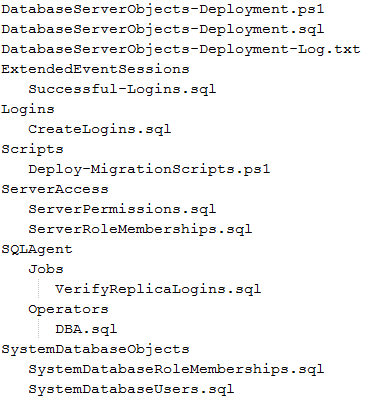
You can see, above, that I am calling a T-SQL file named DatabaseServerObjects-Deployment.sql. This is where all of the real work happens. I like to use the SQLCMD r: command to call smaller, more manageable scripts rather than one large script. I’d start with this directory structure.

Each file should contain repeatable T-SQL (read more on repeatable T-SQL here), such as …
USE [master]

IF EXISTS (SELECT TOP 1 1 FROM sys.server_principals WHERE name = N'LIBERTY\demo1')
	AND IS_SRVROLEMEMBER ('sysadmin','LIBERTY\demo1') = 0
BEGIN
	EXEC sp_addsrvrolemember @loginame = 'LIBERTY\demo1', @rolename = 'sysadmin'
END

IF EXISTS (SELECT TOP 1 1 FROM sys.server_principals WHERE name = N'LIBERTY\demo2')
	AND IS_SRVROLEMEMBER ('sysadmin','LIBERTY\demo2') = 0
BEGIN
	EXEC sp_addsrvrolemember @loginame = 'LIBERTY\demo2', @rolename = 'sysadmin'
END
Then, use this T-SQL script to call the various pieces.
:setvar dtm "SYSUTCDATETIME()"
:setvar dtm2012 "CONVERT(DATETIME2,'1/1/2012')"
:setvar dtm2013 "CONVERT(DATETIME2,'1/1/2013')"
:setvar userAdmin "'00000000-0000-0000-0000-000000000000'"

BEGIN
DECLARE @vServerObjectsDeploymentStartTime DATETIME = GETDATE();
PRINT 'Server Context: ' + @@SERVERNAME
PRINT
'
 +-+-+-+-+-+ +-+-+-+-+-+-+-+-+-+-+-+-+-+-+ +-+-+-+-+-+-+ +-+
 Begin -- Server Objects Deployment Script
 +-+-+-+-+-+ +-+-+-+-+-+-+-+-+-+-+-+-+-+-+ +-+-+-+-+-+-+ +-+
'
+ CONVERT(VARCHAR(30),GETDATE(),120);

--Security
PRINT 'Executing CreateLogins.sql'
:r .\Logins\CreateLogins.sql

PRINT 'Executing ServerRoleMemberships.sql'
:r .\ServerAccess\ServerRoleMemberships.sql

PRINT 'Executing ServerPermissions.sql'
:r .\ServerAccess\ServerPermissions.sql

PRINT 'Executing SystemDatabaseUsers.sql'
:r .\SystemDatabaseObjects\SystemDatabaseUsers.sql

PRINT 'Executing SystemDatabaseRoleMemberships.sql'
:r .\SystemDatabaseObjects\SystemDatabaseRoleMemberships.SQL

--SQL Agent Operators
PRINT 'Executing DBA.sql'
:r .\SQLAgent\Operators\DBA.SQL

--Extended Event Sessions
PRINT ' Executing Successful-Logins.sql'
:r .\ExtendedEventSessions\Successful-Logins.sql

--SQL Agent Jobs
PRINT 'Executing VerifyReplicaLogins.sql'
:r .\SQLAgent\Jobs\VerifyReplicaLogins.sql

PRINT '
 +-+-+-+-+-+-+-+-+-+-+-+-+-+-+ +-+-+-+-+-+-+-+-+ +-+
 Server Objects Deployment Script - Duration =
 +-+-+-+-+-+-+-+-+-+-+-+-+-+-+ +-+-+-+-+-+-+-+-+ +-+
 '
+ CONVERT(VARCHAR(5),DATEDIFF(ss,@vServerObjectsDeploymentStartTime,GETDATE())) + ' seconds';
PRINT '
 +-+-+-+ +-+-+-+-+-+-+-+-+-+-+-+-+-+-+ +-+-+-+-+-+-+ +-+
 End -- Server Objects Deployment Script
 +-+-+-+ +-+-+-+-+-+-+-+-+-+-+-+-+-+-+ +-+-+-+-+-+-+ +-+
 '
 + CONVERT(VARCHAR(30),GETDATE(),120);
END
Once that is all in place, you can call the PowerShell script as a pre-deployment step every time and your entire Availability Group will be in-sync across all replicas.
 Written by Derik Hammer of SQL Hammer
Derik is a data professional focusing on Microsoft SQL Server. His passion focuses around high-availability, disaster recovery, continuous integration, and automated maintenance. his experience has spanned long-term database administration, consulting, and entrepreneurial ventures.
Derik gives the SQL community credit for plugging the gaps in his knowledge when he was a junior DBA and, now that his skills have matured, started SQLHammer.com as one small way to give back and continue the cycle of shared learning.
Derik is the owner and lead author of SQL Hammer, a Microsoft SQL Server resource.
For more information, visit http://www.sqlhammer.com. Follow Derik on Twitter for SQL tips and chat

Leave a Reply